

A month has passed since Day 3, but here's the interesting part - the app went live within that first week. Running a startup means sometimes you get pulled in different directions, but I've been using the finished product daily for three weeks now. Let me walk you through how we crossed the finish line.
The GPT-5 Opportunity
Right after we deployed to Vercel on Day 3, OpenAI released GPT-5 and Cursor made it available for free for one week. This was a game-changer. I immediately switched to the "high/fast" setting - high reasoning capability with quick responses. Yes, it consumed tokens like crazy, but when you get access to the most advanced AI model for free, you maximize that opportunity.
Thanks for reading Second Order AI! Subscribe for free to receive new posts and support my work.
The difference was noticeable. GPT-5 understood context better, made fewer mistakes, and could handle complex refactoring tasks that would have taken multiple iterations with other models.
Connecting Everything to Supabase
My first major prompt to GPT-5 was straightforward: "Finish all pending changes in the application, connecting all functionality to the respective tables in Supabase."
This wasn't a small task. We had built the UI, but many features were just frontend facades:
The font selection in the editor wasn't persisting
Folder organization existed visually but wasn't saving
Draft management was purely client-side
User preferences reset on every reload
I followed up with a more comprehensive instruction: "Look at every page and every feature within each page and ensure they're all connected to Supabase."
GPT-5 methodically went through:
Creating the necessary database schemas
Setting up row-level security policies
Implementing CRUD operations for each feature
Adding proper error handling and loading states
The AI understood that this wasn't just about storing data - it was about creating a seamless experience where every user action was properly persisted and retrieved.
Finding the Identity: Undraft
While the AI was working, I had a realization about what we were building. This wasn't just another text editor or note-taking app. The core purpose was to help people create drafts that they could refine and finalize elsewhere.
The name came naturally: Undraft.
I searched for domains and found that .ink was available - perfect for a writing tool. Undraft.ink felt right. I purchased it through Namecheap (my go-to domain registrar) and connected it to Vercel. The process was simple:
Add the custom domain in Vercel settings
Copy the DNS records Vercel provides
Add them to Namecheap's DNS configuration
Wait a few minutes for propagation
Having a real domain name transformed the project from an experiment to a product.
The React to Next.js Migration
Then I discovered a critical issue. Our React app was entirely client-side rendered, which meant:
Search engines saw empty HTML shells
No content for SEO indexing
Poor performance scores
Missed opportunities for AI engine optimization (yes, that's becoming a thing)
I asked GPT-5 directly: "What is the effort it takes to convert this app to Next.js?"
The AI broke it down:
8-10 hours for basic feature parity with server-side rendering
1.5-2.5 days for full conversion with authentication improvements and polish
Detailed migration steps for each component
Those estimates were for human developers. With GPT-5, we started immediately.
The migration wasn't smooth. We hit several issues:
SSR hydration errors (the classic client/server mismatch)
TipTap editor compatibility problems (it's very client-side dependent)
Build failures from missing window object references
Authentication flow complications
I never opened the code files. Each error, I simply copied back to GPT-5. It would analyze, adjust its approach, and try again. The AI learned from each failure and adapted its strategy.
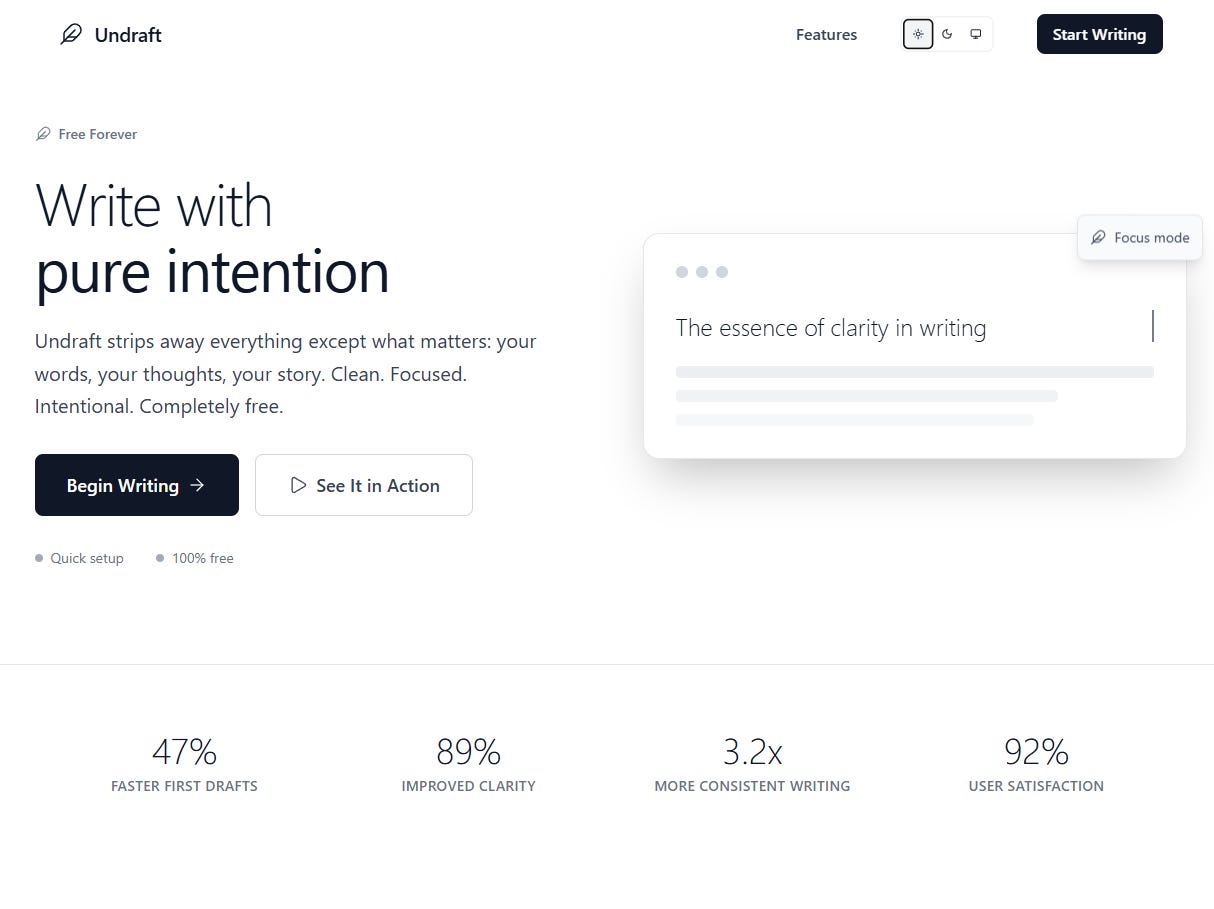
Creating the Landing Page
A product needs a homepage. I started by writing marketing copy myself, then brainstormed with the AI to refine it. We went through several iterations:
Version 1: Feature-heavy, cluttered design with pricing tiers and testimonials. Too much for our minimalist vision.
Version 2: Cleaner but still trying too hard. Multiple CTAs, feature comparisons, the works.
Version 3: Perfect. A single, focused message with our grayscale aesthetic. Clean typography, plenty of whitespace, one clear action.
I gave the AI our brand guidelines - the grayscale color system we'd developed earlier - and it incorporated them beautifully. The landing page now matched the product's minimalist philosophy.
Here’s the chat for you to check it out: Minimalist Blog Editor UI - Claude
Three Weeks of Real-World Testing
Since going live, I've used Undraft daily for:
Writing LinkedIn posts and articles
Drafting business proposals
Creating blog content (including this series)
Quick notes and ideas
The stability has been remarkable. No data loss, no crashes, no frustrating bugs. Just a clean, focused writing experience that gets out of the way.
I've made small improvements along the way:
Added PDF export functionality
Implemented link sharing for drafts
Created an inline formatting toolbar
Fine-tuned the autosave timing
Improved the folder organization UX
Each improvement came from actual usage needs, not hypothetical features.
Technical Insights
The Next.js migration taught me several things:
Server-Side Rendering Matters: Even for app-like products, having proper SSR improves discoverability and initial load performance.
Database Design is Crucial: Our Supabase schema evolved from simple tables to properly normalized relationships with efficient indexes.
Authentication Complexity: Moving from client-side auth to server-side auth in Next.js required rethinking our entire auth flow, but the security improvements were worth it.
Edge Cases Emerge Through Use: Features that seemed complete in development revealed edge cases only through daily usage.
The Development Philosophy
Throughout this process, I maintained one principle: don't look at the code unless absolutely necessary. This forced me to:
Think in terms of features and user experience
Trust the AI to handle implementation details
Focus on what matters: does it work for users?
The only times I looked at code were for configuration files - environment variables, deployment settings, things the AI couldn't infer.
Reflections on AI-Powered Development
"Vibe coding" - building through natural language and high-level instructions - isn't just a gimmick. It's a fundamentally different way to build software. Instead of getting lost in syntax and implementation details, you focus on:
What you want to build
How it should work for users
What problems it should solve
The AI handles the how. You handle the What and Why.
Final Thoughts
Undraft.ink is live, stable, and solving the exact problem I set out to fix. In less than a week of actual coding time (spread over a month due to other commitments), we went from idea to production-ready application.
The key wasn't working more hours or knowing more frameworks. It was about leveraging AI effectively, making smart platform decisions, and staying focused on the core user need.
Is it perfect? No. But it's real, it's useful, and it's being used daily. That's the definition of production-grade in my book.
Here’s the Part 4 Video:
Want to see the result? Visit undraft.ink and experience distraction-free writing. The entire codebase was written through conversational AI, and it just works.
Thanks for reading Second Order AI! Subscribe for free to receive new posts and support my work.